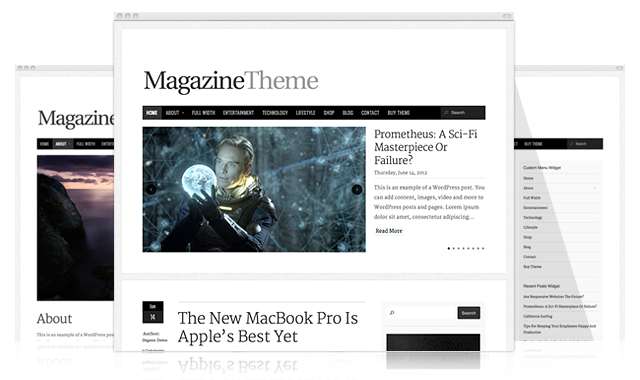
The Magazine Theme has been rebuilt from the ground up. It now features a fully responsive framework, the new WordPress 3.4 custom header and background, WooCommerce shop compatibility, Ajax loading content, HTML5 and CSS3 transitions, color change options and much more. With simple, but powerful customization options, the theme can be changed to match your brand with ease. It’s the only Magazine Theme you will need.
So you want to see the theme in action? Check out the demo and scale your browser window to watch the fully responsive layout take effect. If you’re interested in having the new Magazine Theme automatically installed on the latest version of WordPress with our premium cloud hosting service, check out our Instant Setup form.
For a full list of upgrades, check out the features below:
Fully Responsive Framework
The new Magazine Theme responds to mobile devices with a clean layout, making your content easier to view on iPhones, iPads, Droids and more.
WooCommerce Plugin Compatibility
The WooCommerce plugin is fully compatible with the theme β so adding a shop to your site is a simple process.
Ajax Loaded Content
Additional posts can be loaded on the home page with a simple click β no navigating to the next page.
HTML5 and CSS3
Now featuring HTML5 construction and smooth CSS3 transitions, giving the theme a sleek user experience.
Color Change Options
Link and heading colors can easily be changed in the options to match your brands color scheme.
WP 3.4 Custom Header and Background
The theme utilizes the new WordPress 3.4 custom header and background β giving you more control over the logo, header image and site background.
Social Media Buttons
Facebook Like, Tweet and Google Plus buttons have been added to the home page as well as individual posts and pages.
Three Column Page Template
The theme now features a 3 column page template, giving you more room for widgets, navigation and advertising when you need it.

If we have already purchased the original magazine theme are we eligible for a free theme update?
I have the same question. I already have the magazine theme?
I have also purchased the earlier theme and would like to know if I can get a free theme update.
The latest version of the Magazine Theme is available in the support forums. This update, for all intents and purposes, is an entirely new theme. So you may need to reconfigure your theme options and regenerate your thumbnails.
Hi – I would also like to upgrade, but I can’t access the support thread that gives info on how to do so. I’m not sure why – I get a message that I’m not allowed to view it. I purchased the theme and hosting from Kahuna as a package so I’m not sure why I can’t view the thread. Can you help? Thank you!
Hi Irene,
Can you please contact us (organicthemes.com/contact), and we’ll get your forum permissions sorted. Be sure to tell us your support forum account name, if you have one (desired username if you don’t). We’ll also need your domain name, so I can reference with Kahuna Host.
Thanks,
Jeremy
Will do – thanks so much, Jeremy! π
Hi,
Could I choose to change the font?
Thanks–
You could change the font using a plugin such as this one, http://wordpress.org/extend/plugins/wp-google-fonts/
Hi,
Is it possible to change the header (now the words ‘Magazine Theme’) into my jpg logo? Or can there only be words in that particular place on the website?
Thanks!
Hi Barbara,
You can upload your own header image to replace the default image.
Thanks,
Jeremy
A couple pre sales questions.
1. Does this theme come with more than 1 menu bar option in the header area?
2. Can I use text feature for my blog title?
3. Are there a few ways to use featured images in the posts (ie small boxes or full length)?
Thanks guys
Hi Greg,
1. At present just the one. More can easily be added, and our support forums would help you with that if necessary.
2. The theme is setup to use an image, but with modification can use either.
3. The WordPress post editor allows for complete image manipulation, so at present the featured-image is tailed more for the front-page, than the post page itself.
Thanks,
Jeremy
Thanks Jeremy,
Can the extra menu bar sit above the title?
Nice theme π
Greg
Thanks π
To answer your question: absolutely, it’s just a matter of placing the code for the nav menu above the code for the header / title (all within header.php).
One last question. Can the 2 grouped posts on the bottom of the homepage (under Entertainment in the demo) simply be a continuation of my latests posts according to date or does it have to be populated by a category (ie Entertainment).
Thanks Again — Greg
By default, you can either show a specific category or ‘all categories’, which will show your latest posts according to date. You will probably need to add an off-set parameter to the loop for the two-column section, e.g. if you wanted the two column section to be a continuation of the one column section, but that’s nothing difficult: “‘offset’ => 3”.
Thanks Jeremy. I am getting a good idea here of Organics support π Quick, helpful and friendly. A good way to do business. I am really considering the theme. Thanks Again.
Glad to help π
Shoot sorry… how is the slider loaded… featured posts… latest posts… categories… Also, can I remove the slider altogether and just have the homepage blog style with the loaded posts and the 2 boxes below them? Just making sure I cover my bases. I haven’t purchased from you guys before. Thanks – Greg
No worries π
The slider is Flex Slider (v1.8; will likely be upgraded to v2 in the future), and is loaded via the wp_enqueue_script function, in functions.php.
The featured-posts portions of the homepage are using custom loop queries, and are controlled via our theme options panel (built from the options framework plugin). The options panel is where you would select what content shows in which area of the site, on the basis of categories. You would configure page templates in the same way, e.g. the blog page template.
You can hide the slideshow, yes. There are options for hiding / show the: slideshow, one column element, two column element, header search, etc.
Hi,
Can we translate this theme easily? Is there po and mo files?
Regards.
Hi Nicolas,
The theme is translation ready, with .po / mo files.
Thanks,
Jeremy
How do i get the numbers to appear at the bottom so people can move to the next page?
Mar,
Have more posts than what you’ve configured the particular page template to display.
Hi Jeremy
thanks for taking the time to answer.
I am trying to explain myself better.
I do have tons of pots
but at the bottom there is a series of numbers 1 2 3 4 5 6 etc
that gives you the chance to click and move to the next page.
I do not have it anymore, therefore i do not what widget will allow me to bring those numbers so people can click to the next page do you know what i mean now?
Mar,
That functionality is built into the theme. If it’s no longer showing, then double check your theme options, then try disabling any plugins you have installed. If that doesn’t resolve the issue, start a support forum thread and we can take a closer look.
Thanks!
Hi,
Is it still possible to purchase and install the former version of the Magazine Theme ?
Thanks !
Hi FG,
It is, yes. You would need to purchase the theme as it is today, register for a support account, and then download the previous version of the theme from the Magazine Theme forum (there is a theme archive sticky thread).
Thanks!
I have the previous version of the magazine template. I would love to incorporate some cute social media buttons (I found on the web) into our blog on the the top right hand side but I am not sure how this is possible. My issue is that I want two buttons to appear side by side rather than just one image on top of another. Any suggestions? I need each social media button to link to its individual program. From what I can tell when you include a wigit on the right it only allows you to include one image per line with one link.
I hope you can help. Thanks
Hi Jill,
If you’re using a text widget, you’ll want to add the image code to the text widget, probably styled as an unordered list, which you can then – through CSS – have the images appear side-by-side, rather than on atop the other.
Thanks!
Hello!
Iβm using Magazine theme and have a problem with header menu.
I have main pages and sub pages which should appear when I mouse over the main pages in the header.
But they donβt, the header shows only main pages with a small dot next to them that indicates the page contains more sub pages.
Since it(the drop down) worked when I put all the pages into custom menu not in the header but on the right side bar as a widget, I changed my main header to menu, but it still doesnβt work. The header doesnβt show all the sub pages.
My website: http://www.maumberlin.org
Could anybody help this? Thank you!
Hi Joey,
Can you create a support ticket (http://www.organicthemes.com/support), and we’ll go over this there.
Thanks!
when I enabled the social media buttons they appear at the bottom but in the demo they are vertical on the top right margin. I really like that. How can I configure to do that. Also, I cannot access the support area to get the support documents. Please advise. I emailed you a reply to the original email I got when I purchased the theme. Hopefully between here and there you can help. Thanks.
Hi Endy,
We should have replied to your e-mail (there are no outstanding account-related e-mails). If you didn’t receive a reply, please re-send. Can you also link to your site in your e-mail?
Thanks!
Can someone who has used the Magazine theme for their website post the web address? I’m seriously considering purchasing, but want to see it in action first.
Hi Erica,
You can view a collection of sites using the Magazine Theme, here: http://www.organicthemes.com/showcase/.
Thanks!
Thank you!
I use the original magazine theme. I want to be able to set up Menu links that show the specific “Category” for a post. Like in the demo “Technology”, “Entertainment” etc. How can this be done?
Also will upgrading to the new version of the theme mess up any custom work that I did in the code?
i’m also curious on whether an upgrade would mess up any of my custom settings, or if i’d have to go through the php and css files to replicate the work that was previously done.
thanks!
Hi there,
I have two questions π
1. From what I understand the Magazine Theme v4 has been updated. Do i have to pay to upgrade the theme? If so, where would I go to do this.
2. I have set one of my pages to the Three column format and changed the menu settings to feature the categories that I want on that page. However, the three column page is not showing any of the categories selected, it is only displaying the description of the page.
Looking forward to your reply!
Thanks,
Ariana
Hi Ariana,
Let’s review:
1. You can download the most up-to-date version of the theme from here, at no extra charge (if you have purchased the theme previously): http://www.organicthemes.com/account-page
2. Can you e-mail ‘[email protected]’ with a link to your site, and I will take a look.
Thanks!
I’m attempting to put in a support ticket….however, the system is not recognizing my email address. It is saying that there are no registered users with that email but it is the same one that I used to purchase the theme. I am having the same issues as November 19, 2012 by Joey
Please reply as soon as possible to resolve this π
another question that i have regarding both my current Magazine theme and v4, is whether i can choose to use the 2 column layout to pull in a random selection of posts, with a heading like ‘Other posts you may enjoy’, to pull in some older/archived posts instead of most recent ones.
i’m finding that the way i’ve categorized my blog/posts, it’s hard to show a variety within those 2 or 3 column sections beneath the slider.
any advice would be helpful.
cheers!
http://blog.beentheredunnthat.com
Hi, the built-in Facebook ‘like’ social button seems to be busted in the magazine theme. Any tips on getting this working? Thanks.
Hi Amanda,
We’re currently looking into the cause.
Thanks!
Has this issue been resolved?
I found this as a (temp) solution:
http://wordpress.org/support/topic/facebook-button-not-working#post-3730961
Hi Derek,
You can resolve this issue by updating your theme: http://www.organicthemes.com/account-page.
Thanks!